
Co-managed IT services give your internal IT team a partner for specific work it cannot cover on its own. Your team keeps the responsibilities you agree to retain, while a managed service provider (MSP) takes on defined work such as after-hours escalation, patching or network engineering. Both teams agree on who acts, who approves changes and how work is handed off.
If the same IT manager supports the Houston office and a Fort Bend warehouse, the decision gets concrete fast. Who responds if the warehouse loses connectivity during Saturday shipping? Who can approve a firewall change? If the proposal cannot answer those questions, the scope needs more work.
Key takeaways
- Start with the gap: Identify whether you need more capacity, coverage outside business hours or a specialist skill.
- Assign ownership by task: Give each task one lead, an approver if needed, and a clear handoff trigger.
- Separate monitoring from response: An alert at 2 a.m. does not tell you who will investigate it, call the site or arrange dispatch.
- Compare equivalent quotes: Ask each provider to cover the same hours, sites and systems, and account for the work your team still owns.
- Test the handoff before relying on it: Walk through one urgent incident and ask to see how it would be routed, tracked and closed.
What does co-managed IT support cover?
The scope can be as narrow as support for one function or as broad as day-to-day maintenance across several locations. Start with what your team cannot reliably cover and decide what the provider should own. Networking Pulse’s managed IT services in Houston describe co-managed options such as help desk overflow, engineering escalation and shared ticket visibility. The scope and hours depend on the agreement.
| The gap you need to fill | What the provider could handle | What your team could keep |
|---|---|---|
| Routine support crowds out project work | Agreed ticket types or overflow above a defined queue threshold | Business applications and requests that need internal context |
| Nobody consistently covers a critical shift | First response to specified incidents during nights, weekends or staff leave | Site contacts, operating priorities and approvals |
| An issue needs specialist skills | Escalated network, firewall or cloud investigations | Initial triage and ownership of business decisions |
| Maintenance keeps slipping | Agreed patching, backup checks or restore tests | Maintenance windows, recovery priorities and acceptance checks |
An ongoing service can sit alongside a separate project. If you need a cloud migration but have no continuing support gap, a project agreement may be enough. Ask who will own the system, documentation and recurring costs after handover.
Co-managed IT vs. fully managed IT
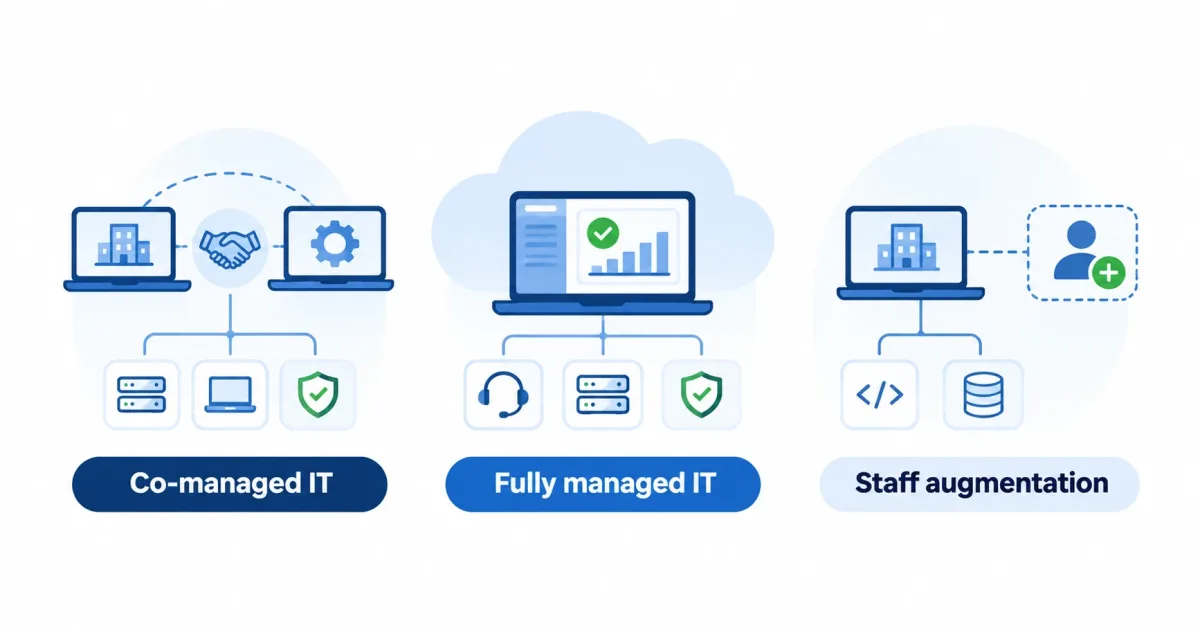
Co-managed IT makes sense when someone inside the business is equipped to own part of the work. Fully managed IT can be a better fit when you want the provider to run most day-to-day operations in scope. In either model, leadership still makes business decisions about risk, budget and priorities.
| Option | Who directs or owns the work? | When it fits |
|---|---|---|
| Co-managed IT | Your team and the provider own different, documented tasks. | You have an internal IT lead and a recurring gap in skills, workload or coverage. |
| Fully managed IT | The provider runs most agreed IT operations; your business retains oversight. | Your team lacks the capacity or mandate to run day-to-day IT. |
| Staff augmentation | An extra person works under your team’s day-to-day direction. | Your process already works and you need a specific skill or more hands. |
Hiring is another option. If the work calls for someone on-site every day who understands production or works directly with employees, compare that role with the work the provider would actually take over. If the gap is occasional network escalation or a defined weekend shift, ask for that scope before comparing it with a full-time hire.
How to divide responsibilities between your team and the provider
Start with one row per task or decision, especially where a handoff changes the person accountable. For example, approving an account change and carrying it out are separate tasks. The following is an illustrative arrangement, not a package or a service commitment.
| Task | Lead | When to hand off or close |
|---|---|---|
| Triage a daytime staff ticket | Internal IT | Escalate agreed issues with affected users, impact and checks already completed. |
| Investigate a weekend connectivity outage | Provider on call, if covered | Accept the ticket and confirm the next update. Call the named site contact if hands-on checks are needed. |
| Approve a change that could interrupt shipping | Internal duty approver | Use the agreed emergency approval rule. Identify a backup if the approver is unavailable. |
| Apply the approved network change | Provider engineer, if in scope | Record the change and outcome. Pass the ticket to the site for validation. |
| Confirm shipping has recovered | Warehouse shift lead | Run a normal shipment test and report the result before the ticket closes. |
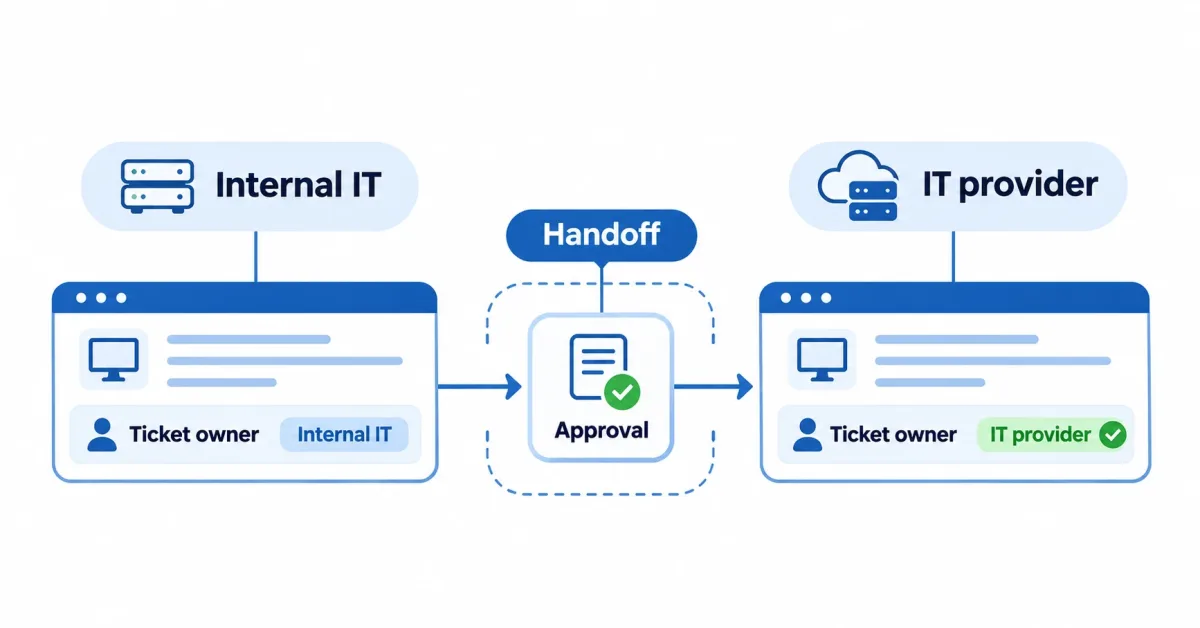
What a Saturday handoff looks like
In this example, a Fort Bend warehouse shift lead reports that multiple packing stations cannot reach the shipping application. The ticket already includes the site, business impact and a callback number. Because the warehouse and shift are in scope, the provider’s on-call engineer accepts the ticket and checks whether the issue is limited to that application or affects site connectivity.
If resolving the incident requires a change that could interrupt another workflow, the engineer contacts the duty approver using the agreed escalation path. After the fix, the shift lead tests an actual shipping transaction. The ticket records who confirmed recovery and who owns any follow-up. This makes it possible to review the handoff, even if the root cause takes longer to resolve.
Use the same split for failed backups: one person investigates the alert, one team performs the agreed restore, and a business owner validates the recovered workflow. For security incidents, NIST’s Cybersecurity Framework 2.0 calls for coordinating supplier responsibilities and involving relevant providers in incident planning, response and recovery.
What to ask before signing a co-managed IT agreement
Ask the provider and your IT lead to walk through a real situation from your environment. Request an example of the responsibility schedule, service commitments and ticket history you would receive.
- What starts the response clock? Find out which channel starts it and whether the commitment means acknowledgement, work beginning or restoration. Ask which priorities and hours it covers.
- Who acts after hours? Separate monitoring, alert review, investigation and on-site dispatch. Confirm which Houston-area addresses and shifts are covered, and what could trigger travel or emergency labor charges.
- Where does the ticket live? If each team keeps its own tools, agree on which record controls ownership, how updates cross systems and who communicates with staff.
- Who can change a critical system? Define which actions can proceed under standing approval and which require a named approver. Ask who provides cover when they are unavailable.
- What access and records stay with us? Keep control of company domains and emergency access. Define provider permissions, logging and revocation. Microsoft’s guidance for administrator roles recommends minimum necessary permissions, multifactor authentication and regular access reviews.
- What happens if we change providers? Agree on which records, configurations and ticket history you can export, when access ends, and who takes ownership of open issues.
Pause if the provider cannot identify who takes ownership after a ticket crosses teams. A shared dashboard makes work visible; it cannot assign responsibility on its own.
How much do co-managed IT services cost?
A useful quote prices a defined scope. User and device counts can matter, but so can covered sites, support hours, included licenses, and whether the provider handles first-line support or only escalations. Ask for Houston managed IT pricing details based on the systems and responsibilities you want covered.
Send the same request to each provider. For example: “Our internal team handles weekday employee tickets. Quote weekend response for warehouse connectivity and senior escalation for the firewall at both sites.” Ask for recurring fees, onboarding, tooling and exceptions to be shown separately. If one quote excludes on-site dispatch or the first hour of emergency work, call that out before comparing totals.
For a first-year comparison, add 12 months of recurring fees, setup and expected separately billed work. Count retained staff and tools when comparing co-managed IT with hiring or full outsourcing. When comparing two providers, do not count retained costs twice; show where those costs differ by proposal. A smaller monthly fee may leave a larger workload with your team.
How to start with Networking Pulse
Bring your IT lead, a list of critical systems, the hours each location operates and two incidents your team struggled to cover. Start with one recurring gap, write down who will own it and test the handoff during onboarding. At the first service review, check whether the agreed work moved off your team’s plate and whether exceptions have owners.
Networking Pulse works with internal IT teams across Greater Houston and Fort Bend County. Request a free IT audit to review your current setup and identify where co-managed support could help.
Frequently asked questions
Can a one-person IT team use co-managed services?
Yes. A solo IT manager can retain internal priorities and day-to-day ownership while using outside support for an agreed gap. Assign a backup approver and decide what the provider can do when the IT manager is unavailable.
Does 24/7 monitoring mean someone will fix issues overnight?
Only if the agreement also includes an appropriate response and remediation scope. Check which alerts are investigated overnight, which issues qualify as emergencies, and whether remote work or on-site dispatch is covered.
Can we use our existing ticketing and monitoring tools?
Possibly. Ask the provider which tools it can work in, whether a second agent or additional license is required, and where both teams will see ticket updates. Agree on tool ownership and data export before making changes.
Is co-managed IT always cheaper than fully managed IT?
No. The provider fee may cover fewer tasks, but you still pay for retained staffing, licenses and other work. Compare the combined cost for the same coverage and responsibilities.
Is this the same as Microsoft co-management?
No. This article describes a service relationship between two teams. Microsoft co-management refers to managing Windows devices with Configuration Manager and Intune together.